Memory for people and their AI
Your assistants forget.
EAM remembers.
EAM keeps one private memory of what you read, write, say and copy — searchable in the browser, and handed to Claude, Kiro, Grok and any other MCP client the moment they need context.
Free to start. Sign in with your Thundera account — no card needed.

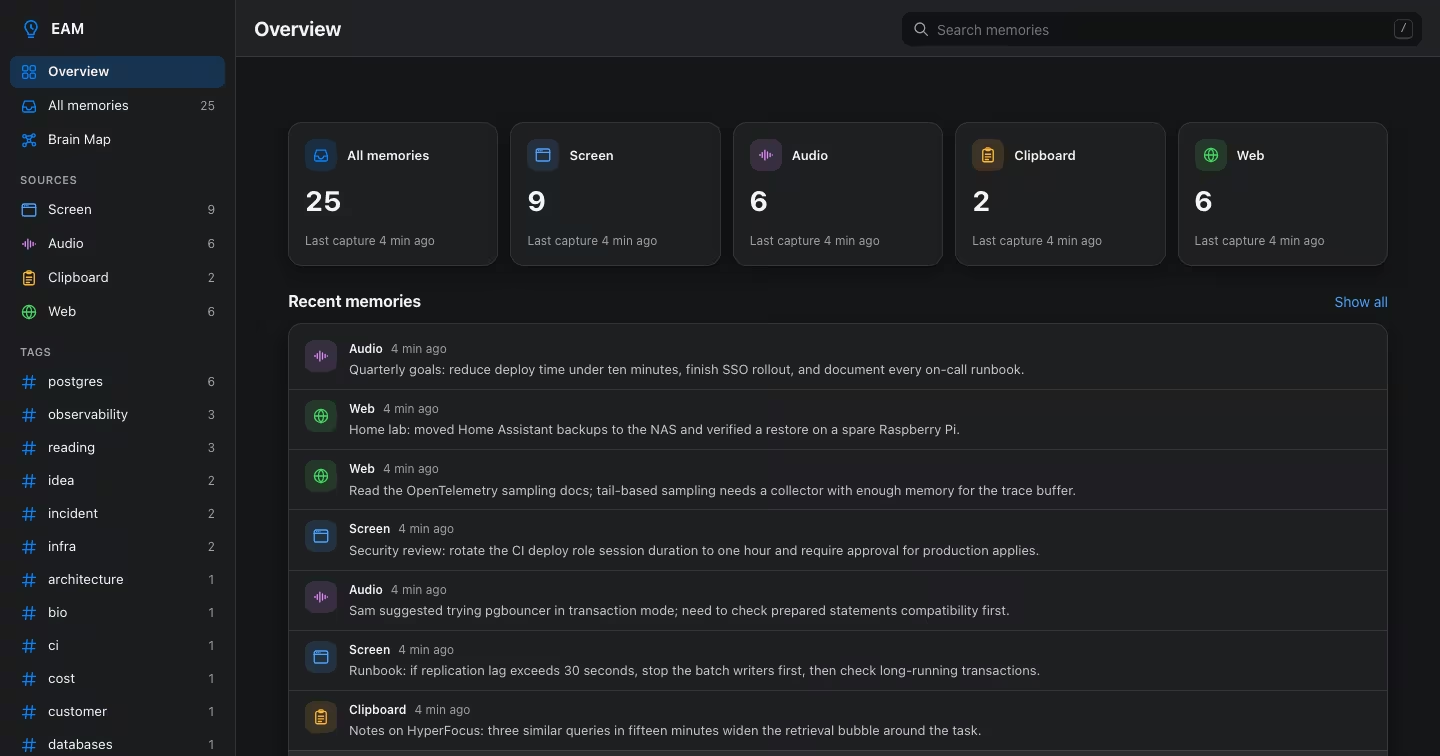
Capture
Everything you see, hear and copy
The EAM desktop app collects context on your Mac. Filter it by source, app, tag or date.
Screen
Text from the apps you work in, tagged with the app it came from. Menu chrome and near-duplicates are filtered out.
Audio
Meetings and voice notes, transcribed on your device in the language that was spoken.
Clipboard
The snippets you copy, so the important ones are never lost.
Web
Pages you read in the browser, searchable by site.
Developer tools
The importer brings in history from your shell, Claude Code, Kiro and Cursor — only the sources you switch on.
Your assistants
Any MCP client can write what it learns with eam_write, so the next conversation starts informed.
Recall
A memory that works the way you think
Find concepts, not just keywords
Semantic vectors plus full-text search (FTS5/BM25) over everything you have stored. Results are ranked by relevance, recency and how often you come back to them.

HyperFocus
Ask about the same task a few times and EAM widens its retrieval around it. When the work is done it resolves and lets go.
Pinned and versioned
Pin what must never be cleaned up. Edits create a new version; the original stays in the memory's history.
Brain Map
See memories as a living graph of clusters, synapses and shared entities — a simplified 2D map in the app and a Full 3D Map at /brain.

Dream consolidation
Raw captures are digested in the background into durable memories — screen digests, weekly and monthly summaries — so your store stays useful instead of just growing.
- Run on a schedule or on demand
- Only anonymised text is ever summarised
- Bodies are never rewritten
How it works
From a moment to a memory in four steps
Capture
The Mac app, the web app, the importer or any MCP client writes text, speech or screen context.
Shield
Passwords and API keys are redacted; personal data is tokenised before anything is embedded or stored.
Remember
A salience gate keeps what matters, chains link new facts to the ones they update, and every account has its own store.
Recall
Search in the browser, or let your assistant call
eam_searchandeam_contextover MCP.
MCP-native
Plug EAM into your AI
Add one MCP server and your assistant remembers across conversations and projects. Sign in with your Thundera account (OAuth), or send an API token.
eam_search— search your memoryeam_write— store something worth keepingeam_context— load context for a task (HyperFocus)eam_proactive_context— surface what is relevant noweam_pin·eam_hyperfocus_resolve
claude mcp add --transport http -s user eam https://eam.thundera.eu/mcp{
"mcpServers": {
"eam": {
"url": "https://eam.thundera.eu/mcp",
"headers": { "Authorization": "Bearer <your-token>" }
}
}
}Privacy
Private by default, yours to take
Your own store
Every account has an isolated memory store. Nobody else's searches can reach it.
Secrets redacted
Passwords and API keys are redacted before a memory is stored — never tokenised, never recoverable.
Export or wipe
Download everything as JSON at any time, restore a backup, or wipe your memory completely.
Thundera
One account across every Thundera app
Sign in once. Plans, billing and your profile live at auth.thundera.eu and follow you everywhere; the apps menu in the top bar moves you between products.
Pricing
Start free, upgrade when your memory grows
See current plans on auth.thundera.eu.
Questions
Can I use EAM without the Mac app?
Yes. The web app and the MCP endpoint work on their own. The Mac app adds automatic capture of screen text, audio, clipboard and web context.
Which assistants work with EAM?
Any client that speaks the Model Context Protocol over HTTP — Claude Code, Kiro, Grok, Perplexity and others. See the MCP guide.
What happens to my passwords and API keys?
They are redacted before a memory is stored. They are not tokenised and cannot be recovered from EAM.
Is my data used to train models?
No. EAM does not train models on your memories, and each account has its own isolated store.
Can I take my data with me?
Yes. Settings → Data downloads every active memory as JSON, restores a backup, or wipes your memory entirely.
Where are plans and invoices managed?
At auth.thundera.eu/billing, together with your other Thundera apps.
Stop forgetting.
Sign in with your Thundera account and connect your first AI assistant in a minute.